- Published on
An Introduction to GitHub Stacked Pull Requests
13 min read- Authors

- Name
- Daniel Mackay
- @daniel_mackay
- Introduction
- What is a stacked PR?
- The experiment
- Step one - the first PR into main
- Step two - stacking the second PR on top
- GitHub spots the stack
- The part devs often get wrong - updating the bottom PR
- Merging the stack - both PRs at once
- What if you don't use the stack feature?
- Gotchas
- Summary
- Resources
Introduction
I've got a bad habit. When I'm deep in a feature, I keep spotting other changes that "may as well" go in while I'm here. That's scope creep, and every time it happens the PR gets a bit bigger. It makes life easier for me as the author. But it piles unneeded cognitive load onto the reviewer, who now has to mentally switch between several sets of seemingly unrelated changes to make sense of the thing. So they don't, really. They skim, they approve, and the bugs sail through.
I've been looking into stacked PRs for a while now. The idea is that instead of one giant PR, you build a chain of small ones, where each PR targets the branch below it rather than main. Tools like Graphite and spr have been doing this for years. But they come with a catch. You're either paying for licensed software or bolting a somewhat complex CLI onto your toolchain. GitHub has now quietly shipped native support for stacking. I wanted to understand exactly how it works, and what I'd be getting myself into, before trying it on real client projects.
So I did what I always do. I made a throwaway repo and ran a real experiment. This post is that experiment, screenshots and all. We'll create a two-PR stack, see what GitHub does when you go back and change the bottom PR after the top one already exists (this is the part that usually bites people), and then merge the whole stack in a single click.
NOTE: Everything here is native GitHub. No CLI, no third-party tool, no browser extension. Just the PR UI you already have.
What is a stacked PR?
A normal PR compares your feature branch against main. A stacked PR compares your branch against another feature branch that also has an open PR.
Picture two changes where the second depends on the first:
main
  └── feature/add-greeting      →  PR #4 into main
        └── feature/use-greeting  →  PR #5 into feature/add-greeting
feature/use-greeting is branched off feature/add-greeting, not off main. Its PR targets feature/add-greeting. That one detail is the whole feature. Everything else GitHub does is built on top of it.
Why bother? Because each PR in the stack only shows its own changes. The reviewer looking at the top PR sees the five lines you added there, not the fifty lines from the PR underneath. You get to keep working on step two while step one is still in review, instead of blocking yourself. And when review comes back, the diffs are small enough that people actually read them.
This matters more now than it used to. AI coding agents like Claude Code have gone mainstream, and producing code and raising PRs is faster than it's ever been. When you're generating changes that quickly, you naturally end up with work that builds on other work that builds on other work. You don't want to block yourself from starting the next thing while the last one is still in review. So you branch off a branch off a branch. Before stacked PRs were a native feature you could still do this in the GitHub UI by hand, but keeping that chain of branches in order was an absolute nightmare.
The experiment
I used a sandbox repo called stacked-prs with nothing in it but a README. Then I built the smallest change I could think of that has a real dependency between two steps:
- Step one adds
src/greeting.js, which exports agetGreeting()function. - Step two adds
src/app.js, which importsgetGreeting()and prints it.
Step two literally cannot work without step one. That's the point. This is exactly the situation where you'd reach for a stack instead of cramming both files into one PR.
Step one - the first PR into main
Nothing special here. Branch off main, add the greeting module, push, open a PR. This is the bottom of the stack, so it targets main like any other PR.

feature/add-greeting into main.Step two - stacking the second PR on top
Now the interesting bit. I branched feature/use-greeting off feature/add-greeting (not off main), added app.js, and when I opened the PR I set the base to feature/add-greeting.
Look at the header. It says "wants to merge 1 commit into feature/add-greeting from feature/use-greeting". That base branch is what makes this a stacked PR.

feature/add-greeting, not main. That single choice is the entire trick.Here's the payoff, and it's the reason to do any of this. Open the Files changed tab on the stacked PR. It shows only app.js. The greeting.js change from the PR below it is nowhere to be seen, because that change belongs to the base branch, not to this PR.
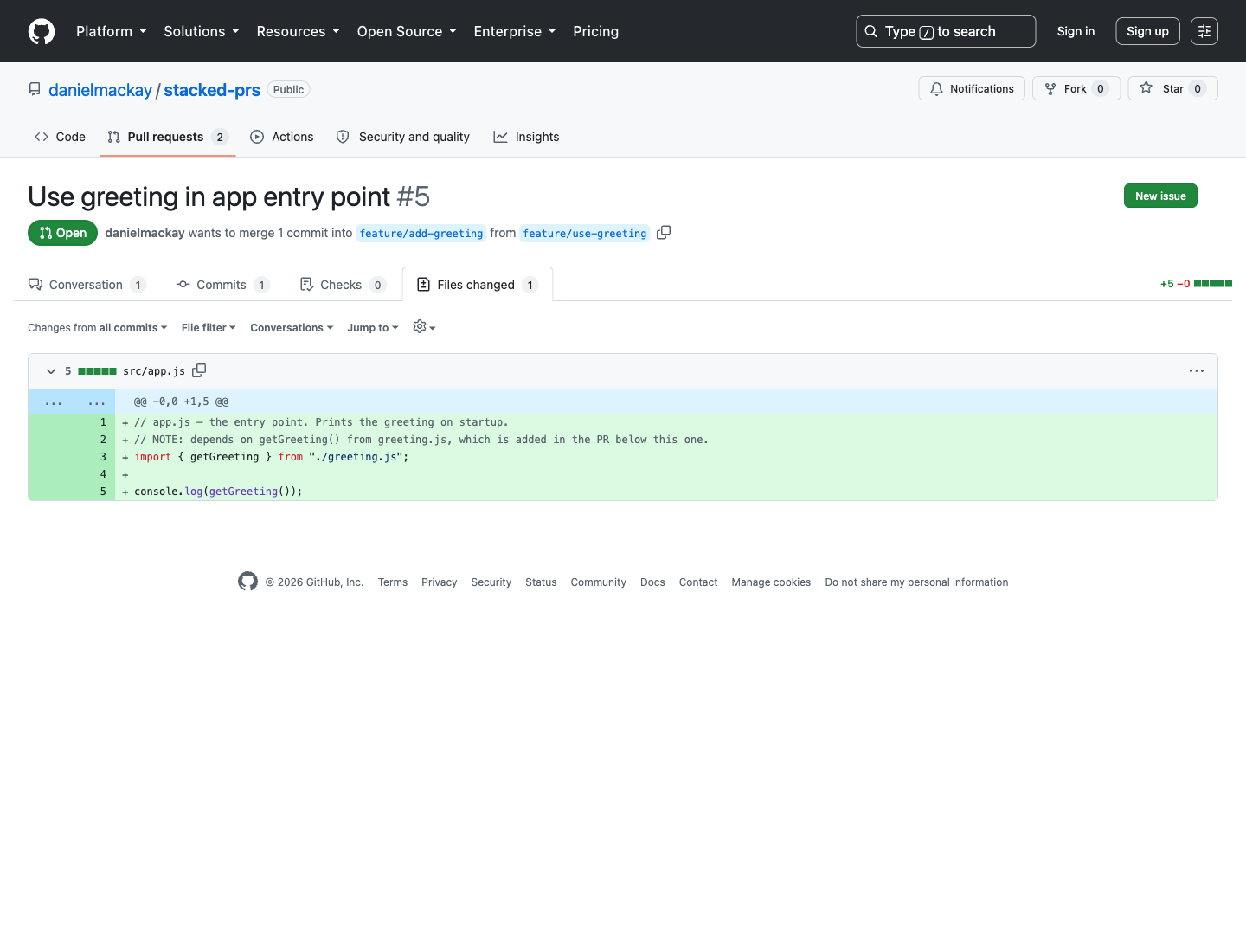
This is the difference between "review my 40-file PR" and "review these five lines". Same total change, completely different review experience.
GitHub spots the stack
Once both PRs exist, GitHub notices they form a stack and shows a blue banner on the stacked PR: "This pull request can be stacked with other pull requests."

Hit Preview stack and you get a proper visualisation of the whole chain, top to bottom, down to main. This is the first moment it really feels like a stack rather than two loosely related PRs.
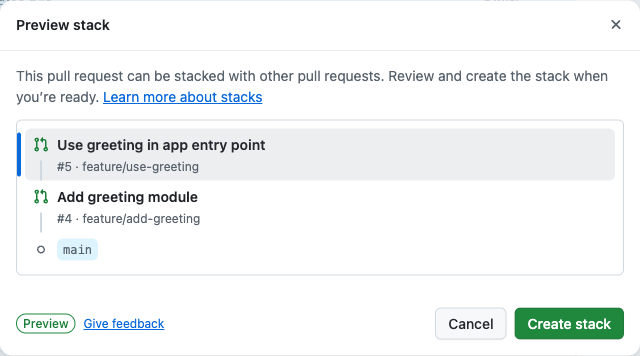
main. Click Create stack and GitHub starts managing it as a unit.Once you click Create stack, GitHub tracks the two PRs together and gives you stack-aware tooling: a position badge on each PR (1/2, 2/2), a combined merge experience, and the ability to rebase the entire stack at once. That last one matters more than it sounds, as we're about to see.
The part devs often get wrong - updating the bottom PR
Here's the scenario that trips people up with stacks. You've opened both PRs. A reviewer leaves a comment on the bottom PR (step one). You go back and push a fix to feature/add-greeting. What happens to the PR stacked on top of it?
I did exactly that. I pushed a second commit to feature/add-greeting that tweaked the greeting. The bottom PR now shows two commits, as you'd expect:
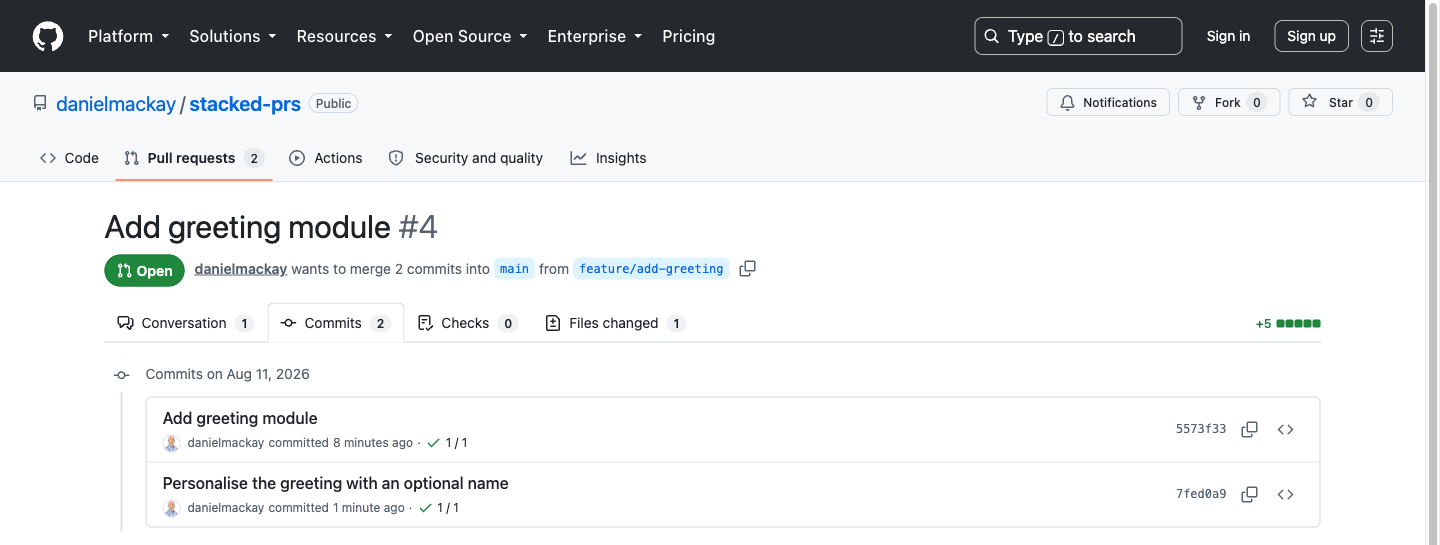
But the branch on top, feature/use-greeting, was created from the old tip of feature/add-greeting. It doesn't have that new commit. The branches have diverged. And this is where the native stack feature earns its keep, because it tells you so, right in the merge box:
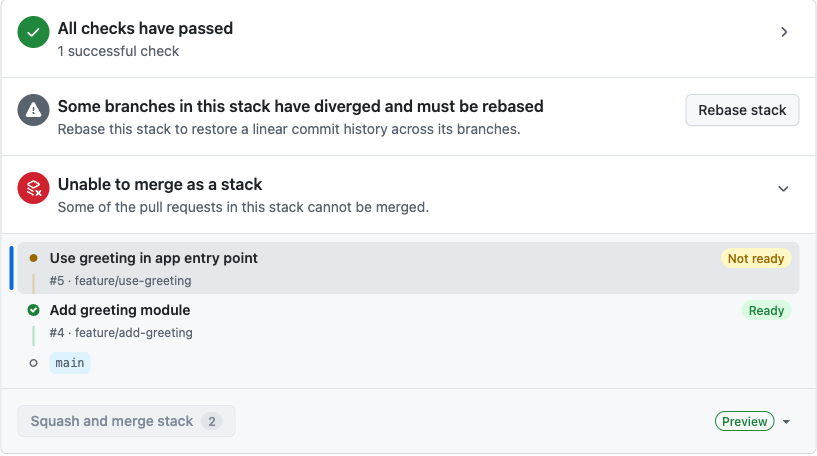
Without stacks, this is the annoying manual dance: check out the top branch, merge or rebase the bottom branch into it, resolve anything that conflicts, force-push, repeat for every branch above it. In a tall stack that's genuinely tedious.
With the stack, you click Rebase stack. GitHub is upfront about what that does before you commit to it:
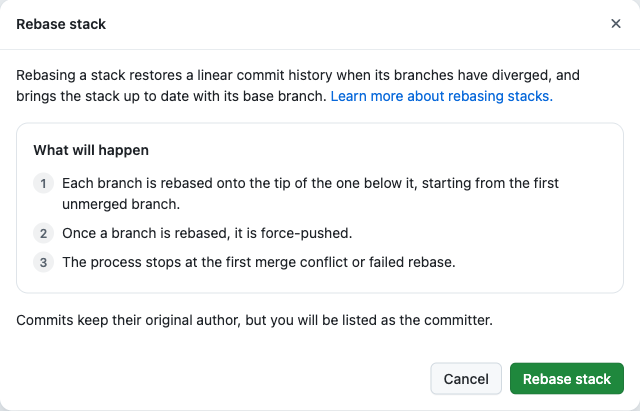
One click, and GitHub rebased feature/use-greeting onto the updated tip of feature/add-greeting and force-pushed it for me. The divergence is gone and both PRs go green.
Merging the stack - both PRs at once
This was the moment I actually wanted to test, because it's the bit that sounds too good to be true. With a healthy stack, the merge box changes its tune to "Able to merge as a stack - Merging this pull request will also merge 1 pull request below it."
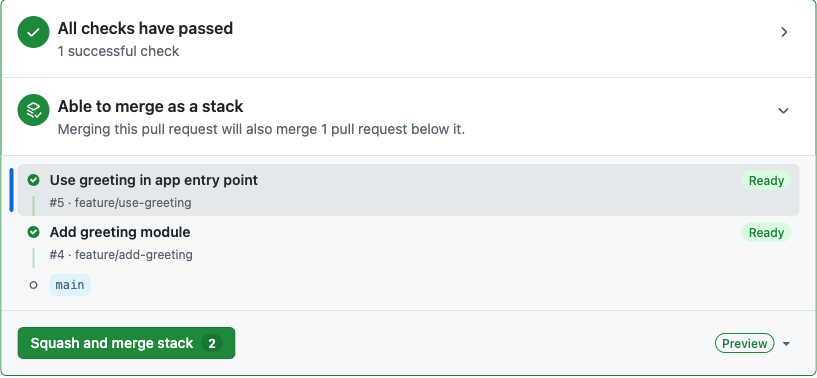
So I clicked Squash and merge stack, confirmed, and GitHub merged both PRs into main in a single action. No merging the bottom one, waiting for the top one to retarget, then merging that too. The whole stack landed at once.
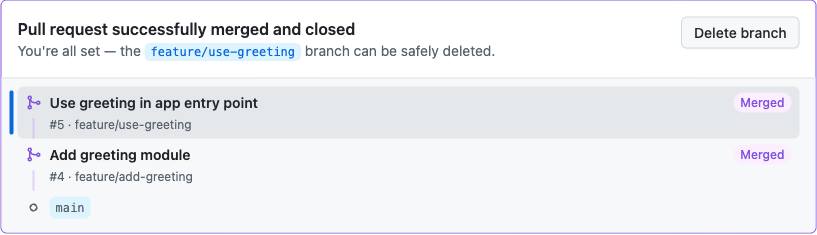
And the proof is in the commit history on main. Two squashed commits, one per PR, both landed within seconds of each other:
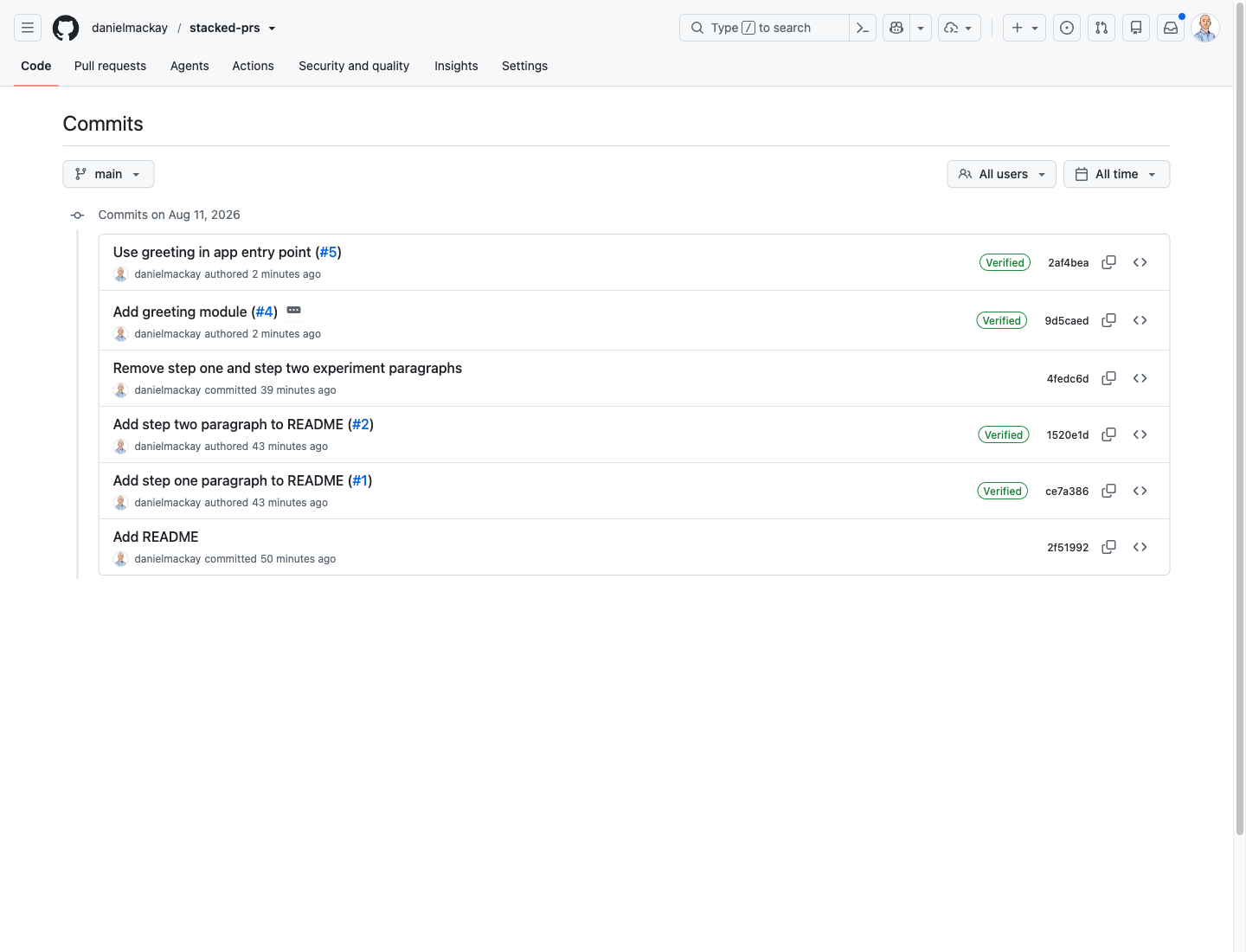
main. One commit per PR, in stack order.What if you don't use the stack feature?
You don't strictly need Create stack to work this way. The stacking itself is just the base-branch trick from step two, and it works on any GitHub repo.
If you skip the stack tooling and merge the bottom PR (step one) on its own, GitHub does something genuinely helpful: it automatically retargets the open PR that was pointing at that now-merged branch, changing its base to main. So after you merge and delete feature/add-greeting, PR #5 quietly re-points itself at main, and you merge it as a normal PR. It's two separate merges instead of one, but you're never left with a PR pointing at a dead branch.
The native stacks feature (Create stack → Rebase stack → Squash and merge stack) is the nicer experience by a mile. But it's good to know the base-branch mechanics underneath work fine on their own, and that GitHub won't strand you if you merge things one at a time.
Gotchas
A few things I ran into that are worth knowing before you try this on real work.
Rebasing force-pushes your branches. The rebase dialog says it plainly. Every branch in the stack above the change gets rewritten and force-pushed. That's completely fine for your own feature branches, but if someone else has checked out one of those branches, you've just rewritten history under them. Communicate before you rebase a shared stack.
Squash-and-merge changes the commit SHAs. Squashing is lovely for a clean main, but it means the commits that land are brand new commits, not the ones from your branch. In a stack this is handled for you by the combined merge, which is exactly why the combined merge exists. Merging stacked PRs one at a time with squash, without the stack tooling, is where you can get into a mess as each squash rewrites the base the next PR was built on.
Keep the stack shallow. Two PRs was trivial. A five-deep stack is a different beast. Every time the bottom moves, everything above it needs a rebase. Stacks are a tool for splitting one coherent feature into reviewable slices, not an excuse to keep fifteen branches in flight at once. IMO three or four is about the practical ceiling before the coordination cost eats the benefit.
It's still base branches under the hood. If any of this ever confuses you, remember there's no magic. A stacked PR is a PR whose base is another PR's branch. Everything GitHub layers on top - the banner, the preview, the combined merge - is convenience over that one fact.
Summary
Stacked PRs solve a real problem. Big PRs get rubber-stamped instead of reviewed, and stacks let you break one large change into small PRs that each stand on their own.
- A stacked PR is just a PR that targets another branch instead of
main. That's the whole idea. - Each PR's diff is scoped to its own change, so reviewers see five lines, not fifty.
- Update the bottom of the stack and the top goes out of date. GitHub detects the divergence and gives you a one-click Rebase stack to fix it, instead of the manual checkout-merge-force-push dance.
- The whole stack merges in one action. Squash and merge stack lands every PR on
maintogether, in order. - Even without the stack feature, the mechanics work, and GitHub auto-retargets a stacked PR to
mainwhen its base branch is merged and deleted.
I went in sceptical and came out a fan. The native experience is good enough that I'd reach for it on my next feature that wants to be three PRs instead of one. Give it a try on a throwaway repo like I did, and let me know how you go. 😀
Resources
- About stacked pull requests (GitHub's own overview)
- Rebasing a stack
stacked-prs(the sandbox repo from this post)- Graphite and spr (third-party stacked-PR tooling, if you want it outside GitHub)