- Published on
EF Core Migrations in Aspire - The New Way with AddEFMigrations
18 min read- Authors

- Name
- Daniel Mackay
- @daniel_mackay
- Introduction
- Prerequisites
- The Old Way - One Worker Doing Three Jobs
- Enter AddEFMigrations
- Wiring It Up in the AppHost
- Pinning dotnet-ef
- Keeping Seeding Out of Production
- Deploying - What Aspire Does and Doesn't Do
- Gotchas
- Summary
- Resources
Introduction
Every Aspire + EF Core sample I've ever read tells you the same thing: create a worker project, call Database.MigrateAsync() in a BackgroundService, register it in the AppHost, and have your API WaitForCompletion() on it. The official Aspire docs still walk you through building exactly that. I've written that worker at least four times.
It works. But it's a lot of code you didn't want to write, and it quietly does more than its name suggests.
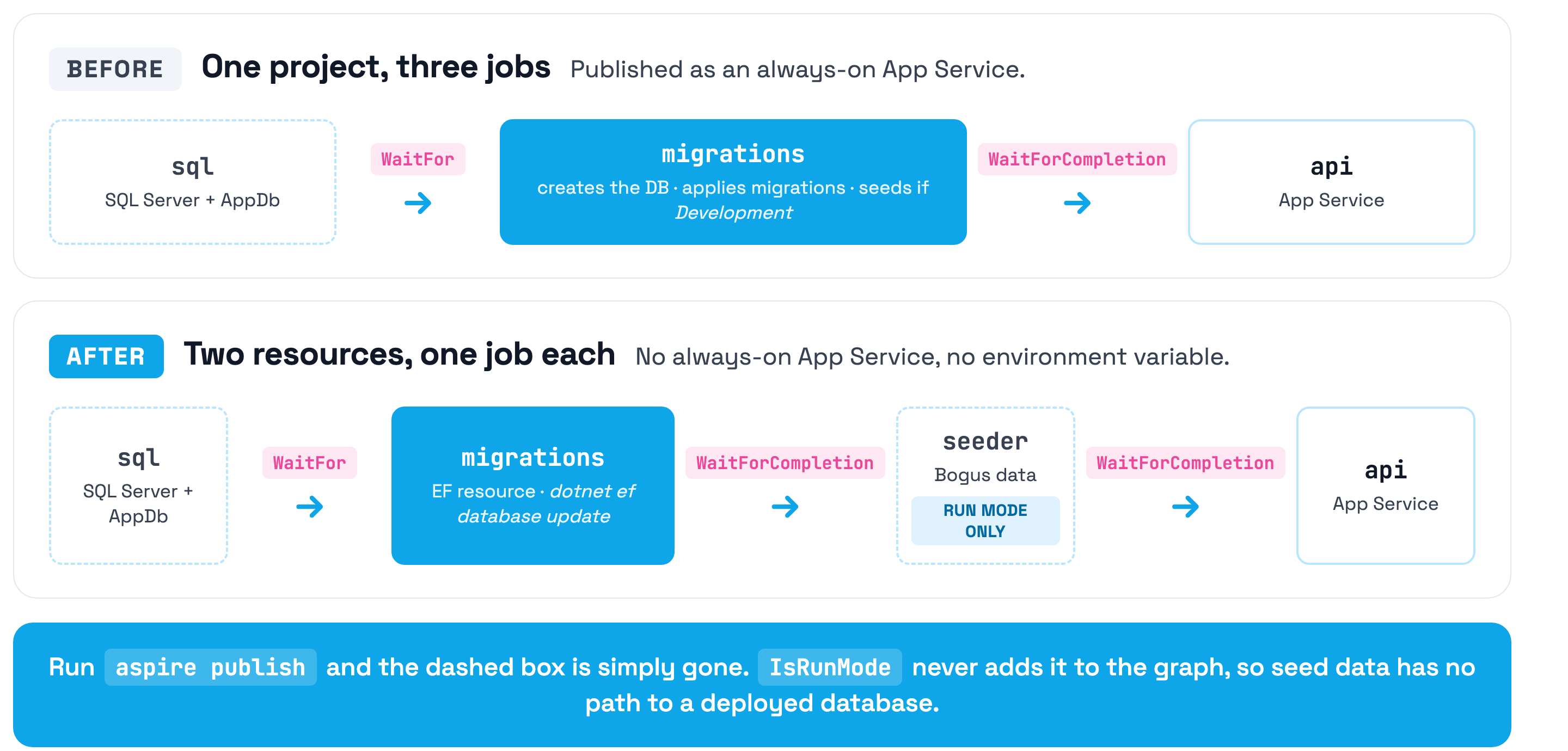
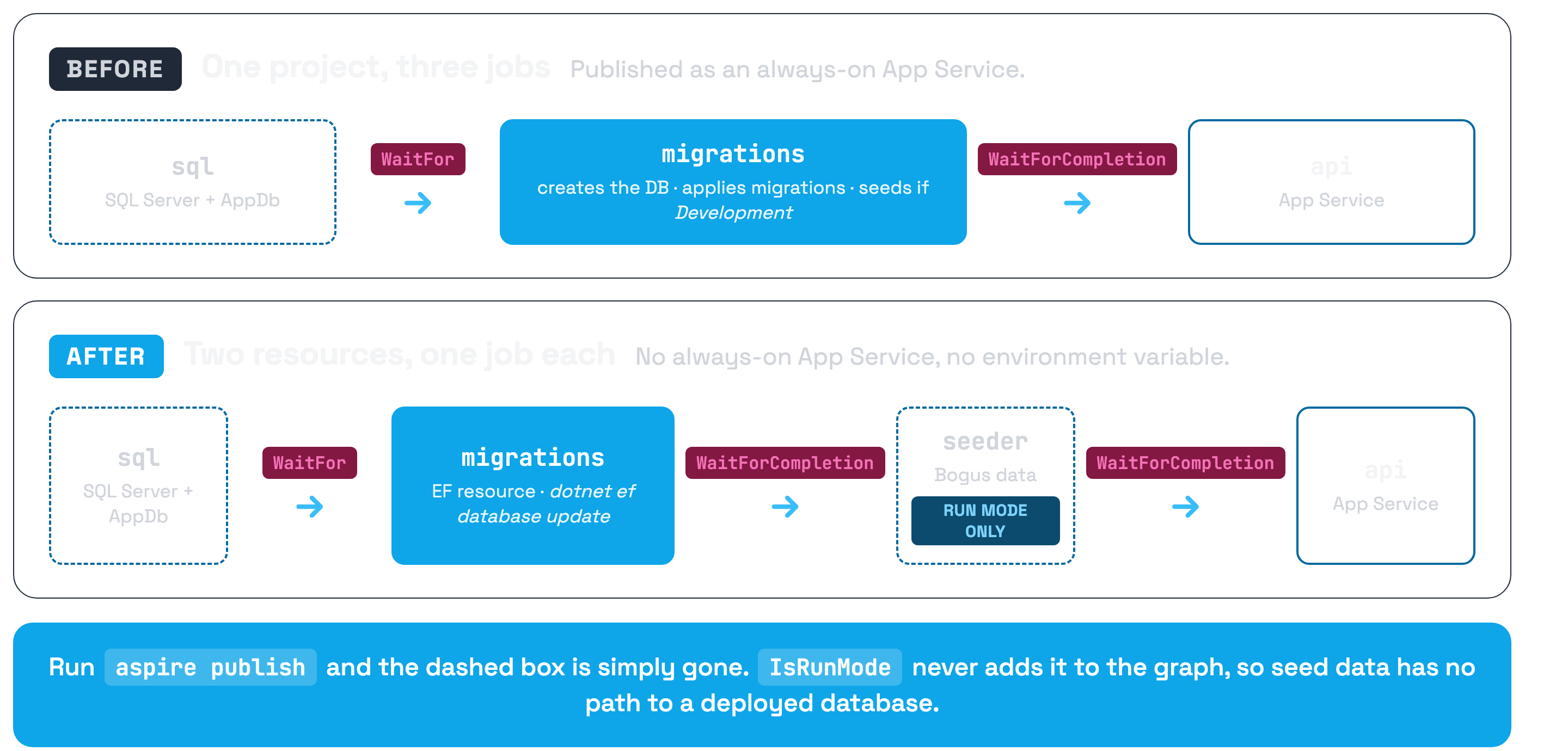
I recently went through a grilling session on the MigrationService in the SSW Vertical Slice Architecture template, and the thing fell apart under scrutiny. That project was doing three jobs at once. On Azure it was published as an App Service with IsAlwaysOn = true. A web app that ran for about forty seconds at startup and then idled forever on a B1 plan. And the only thing standing between Bogus fake data and a production database was an IsDevelopment() check, which depended on an environment variable the deploy docs told you to set to Development. 🤷
Aspire now ships AddEFMigrations, which models migrations as a first-class resource instead of a project you wrote yourself. We adopted it in PR #300, deleted the bespoke plumbing, and killed the always-on App Service.
In this post we'll look at what the old approach actually costs you, how to wire up AddEFMigrations, how to make seeding structurally impossible in a deployed environment, and the one thing that gets worse when you make this change.
Prerequisites
- .NET 10 SDK
- Aspire CLI
- Docker / Podman / OrbStack for the local SQL container
- The
Aspire.Hosting.EntityFrameworkCorepackage in your AppHost dotnet-ef, available locally. More on this below, because it's now a hard requirement to boot the app
NOTE: At time of writing, Aspire.Hosting.EntityFrameworkCore has only ever shipped on the prerelease channel. We pinned 13.4.6-preview.1.26319.6. If you're allergic to prerelease packages in production, skip to the gotchas first.
The Old Way - One Worker Doing Three Jobs
Here's the shape of the classic migration worker. This is what the template had, and it's near-identical to what the Aspire docs recommend:
protected override async Task ExecuteAsync(CancellationToken stoppingToken)
{
    using var activity = ActivitySource.StartActivity("Migrating database", ActivityKind.Client);

    var sw = Stopwatch.StartNew();
    using var scope = serviceProvider.CreateScope();
    var environment = scope.ServiceProvider.GetRequiredService<IHostEnvironment>();

    var initializer = scope.ServiceProvider.GetRequiredService<ApplicationDbContextInitializer>();
    await initializer.EnsureDatabaseAsync(stoppingToken);
    await initializer.CreateSchemaAsync(true, stoppingToken);

    if (environment.IsDevelopment())
    {
        await initializer.SeedDataAsync(stoppingToken);
    }

    sw.Stop();
    logger.DatabaseInitialized(sw.Elapsed);
}
Count the jobs. Create the database. Apply the migrations. Seed dev data. Three responsibilities, one ExecuteAsync, and the only separation between them is an if.
Now look at how it got registered in the AppHost:
var migrationService = builder.AddProject<MigrationService>("migrations")
    .PublishAsAzureAppServiceWebsite((_, site) =>
    {
        const string envNetCoreEnvironment = "ASPNETCORE_ENVIRONMENT";

        // Needed for hosted service to run
        site.SiteConfig.IsAlwaysOn = true;

        // Dynamically set environment, so we can enable seeding of data (only happens in 'development')
        var environment = Environment.GetEnvironmentVariable(envNetCoreEnvironment);
        if (string.IsNullOrWhiteSpace(environment))
            return;

        var envSetting = new AppServiceNameValuePair { Name = envNetCoreEnvironment, Value = environment };
        site.SiteConfig.AppSettings.Add(new BicepValue<AppServiceNameValuePair>(envSetting));
    })
    .WithReference(db)
    .WaitFor(sqlServer);
Three problems here, and they compound.
It's a web app that isn't a web app. A BackgroundService needs the host to stay alive long enough to run, so IsAlwaysOn = true goes on. You're now paying for an App Service that does nothing after its first minute. On the B1 plan the template uses, that's real money for an empty process. If you followed my post on deploying Aspire to Azure App Service, this is the second App Service in that setup. It turns out you don't need it.
Migration progress is invisible. In the dashboard it's a project called migrations that looks like every other project. Did it apply anything? Which migration? You're reading log lines to find out.
Seeding is guarded by a string comparison. IsDevelopment() reads ASPNETCORE_ENVIRONMENT. And because the seeding only worked when that value was Development, the deploy instructions said:
azd env set ASPNETCORE_ENVIRONMENT Development
Read that again. The published deployment guide told you to set your production App Service to Development so that a background worker would seed it with fake superheroes. It worked as designed, and the design was wrong.
Enter AddEFMigrations
AddEFMigrations lives in Aspire.Hosting.EntityFrameworkCore:
dotnet add package Aspire.Hosting.EntityFrameworkCore
The key idea: it's an extension on a project resource you already have, not a new project you write. You point it at the project that hosts your DbContext, and Aspire shells out to dotnet ef on your behalf.
var sqlServer = builder.AddSqlServer("sql");
var db = sqlServer.AddDatabase("AppDb", "app-db");

var api = builder.AddProject<WebApi>("api")
    .WithReference(db);

var migrations = api.AddEFMigrations("migrations");
That's it. No worker project, no Database.MigrateAsync(), no EnsureCreated().
Aspire finds the DbContext by looking in the target assembly. If you've got more than one, pass the fully qualified type name as the second argument:
var migrations = api.AddEFMigrations("migrations", "MyApp.Data.OrdersDbContext");
In the SSW template, both the ApplicationDbContext and the migrations live in src/WebApi, and it's the only context in that assembly, so neither the type name nor WithMigrationsProject<T>() is needed. If your migrations live somewhere else (a Clean Architecture Infrastructure project, say), that's what WithMigrationsProject<T>() is for:
var migrations = api.AddEFMigrations("migrations")
    .WithMigrationsProject<Projects.Infrastructure>();
The payoff shows up immediately in the dashboard. Migrations get their own resource with a real lifecycle:
| State | What it means |
|---|---|
Pending | Waiting on the database resource to become healthy |
Running | Executing dotnet ef database update |
Finished | Migrations applied |
FailedToStart | Something blew up. Logs are right there. |
You also get a Commands menu on the resource, and it's more than a status readout. Update Database, Drop Database, Reset Database, Add Migration, Remove Migration and Get Database Status are all right there in the dashboard. dotnet ef migrations add from a terminal still works exactly as it always did, but for the day-to-day loop of "blow the local database away and start again" it's hard to beat a menu item.
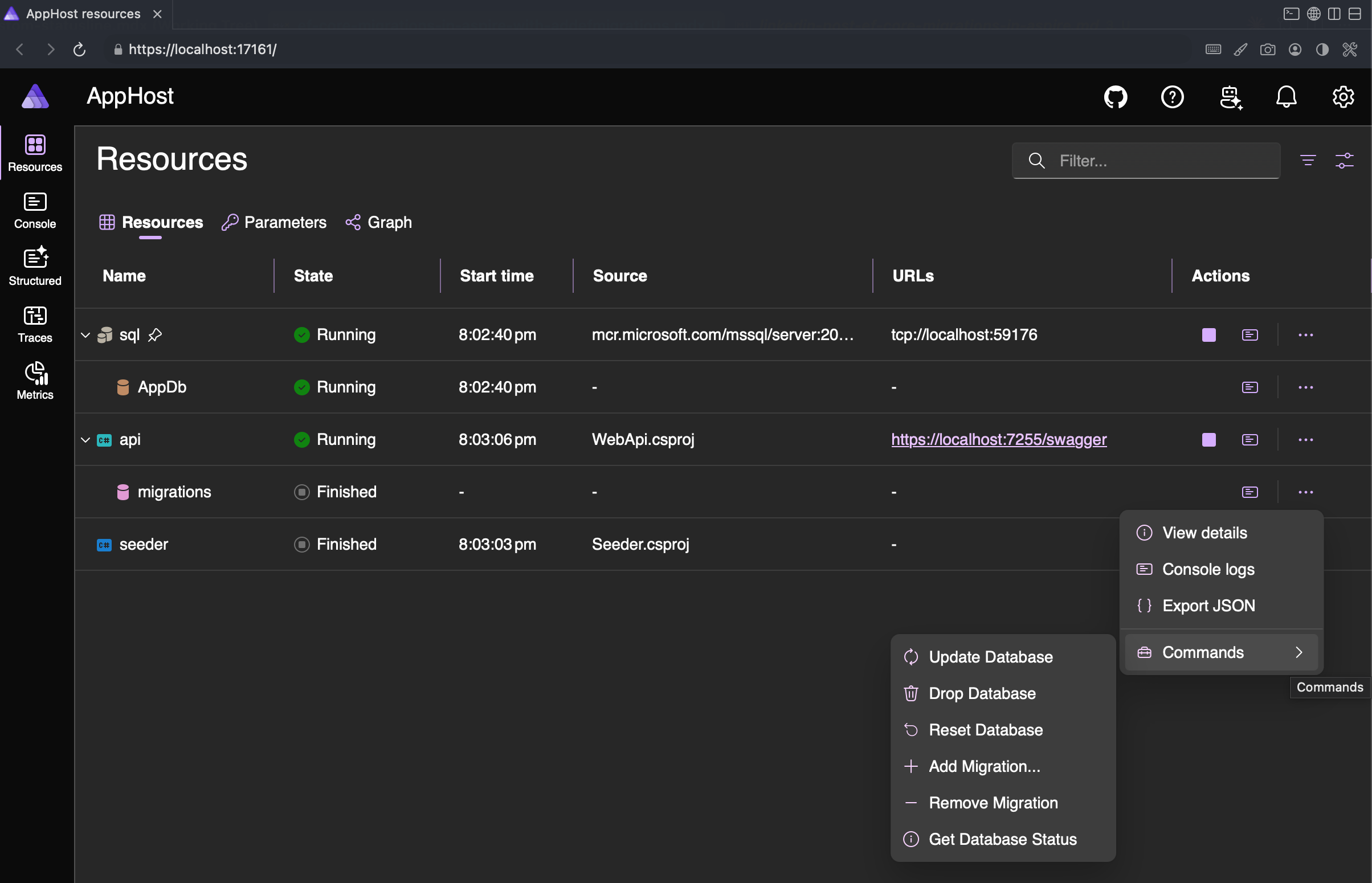
Figure: migrations sits in the resource list like anything else, reaching Finished before seeder and api start. Its Commands menu puts the everyday EF operations one click away.
Wiring It Up in the AppHost
Here's the full registration from the template, with everything turned on:
var api = builder
    .AddProject<WebApi>("api")
    .WithExternalHttpEndpoints()
    .WithReference(db);

var migrations = api.AddEFMigrations("migrations")
    .WithReference(db)
    .WaitFor(sqlServer)
    .RunDatabaseUpdateOnStart()
    .PublishAsMigrationBundle();
Four methods, and each one earns its place:
WithReference(db) is the authoritative source of the connection string. Aspire will fall back to inferring it from WaitFor() dependencies if you leave this off, but I'd rather be explicit. This is the one value that decides which database gets migrated.
WaitFor(sqlServer) holds the resource in Pending until SQL Server is actually accepting connections. Without it you get a race on a cold container start.
RunDatabaseUpdateOnStart() is local-only. It runs dotnet ef database update during aspire run and registers a health check so downstream resources can wait on it. It does nothing at publish time, which is deliberate. Nobody wants a deployed app migrating its own database on boot.
PublishAsMigrationBundle() produces an EF Core migration bundle during aspire publish. Note the word produces. It writes an artifact, it doesn't run one. There's a whole section on that below, and it's the one genuine regression in this change.
Pinning dotnet-ef
Since Aspire shells out to dotnet ef, the tool has to be there. This is a real behaviour change: previously the app booted with nothing but the SDK installed. Now it doesn't boot at all without dotnet-ef.
The fix is a local tool manifest rather than telling everyone to install a global tool:
{
  "version": 1,
  "isRoot": true,
  "tools": {
    "dotnet-ef": {
      "version": "10.0.10",
      "commands": ["dotnet-ef"],
      "rollForward": false
    }
  }
}
Save that as .config/dotnet-tools.json, commit it, and add one line to CI:
- name: Restore tools
  run: dotnet tool restore
Does Aspire actually honour the manifest, or does it just hit PATH? I checked, because a mismatched dotnet-ef against your EF Core packages is a fun afternoon. It honours it. Aspire invokes dotnet tool exec dotnet-ef --yes -- database update ..., which resolved the manifest's 10.0.10 on a machine whose PATH offered a global dotnet-ef 9.0.3. Neat.
The --yes is a nice touch too. A developer who forgets to run dotnet tool restore gets the pinned version fetched on demand rather than a cryptic error.
Keeping Seeding Out of Production
This is the half of the change I actually care about.
AddEFMigrations only does migrations. It doesn't seed. So what happens to your seed data?
The tempting answer is EF Core's UseSeeding / UseAsyncSeeding hooks. No separate project, and seeding lives right next to the model. I don't like it for this. It puts Bogus into the WebApi's production dependency graph, and seeding then runs from inside the app, which means an environment check is once again the only thing between a deployment and a database full of fake data. That's the exact failure mode we started with.
The better answer is to move the guard out of the app entirely and into the AppHost:
if (builder.ExecutionContext.IsRunMode)
{
    var seeder = builder.AddProject<Seeder>("seeder")
        .WithReference(db)
        .WaitForCompletion(migrations);

    api.WaitForCompletion(seeder);
}
else
{
    api.WaitForCompletion(migrations);
}
IsRunMode is the whole trick. During publish, the seeder resource never enters the graph at all. Run aspire publish and grep the output: there is no seeder. No App Service, no environment variable, no connection string, nothing.
That's the difference between a guard and a structure. IsDevelopment() is a string comparison that a well-meaning azd env set can defeat. IsRunMode means the thing you're afraid of doesn't exist in the artifact.
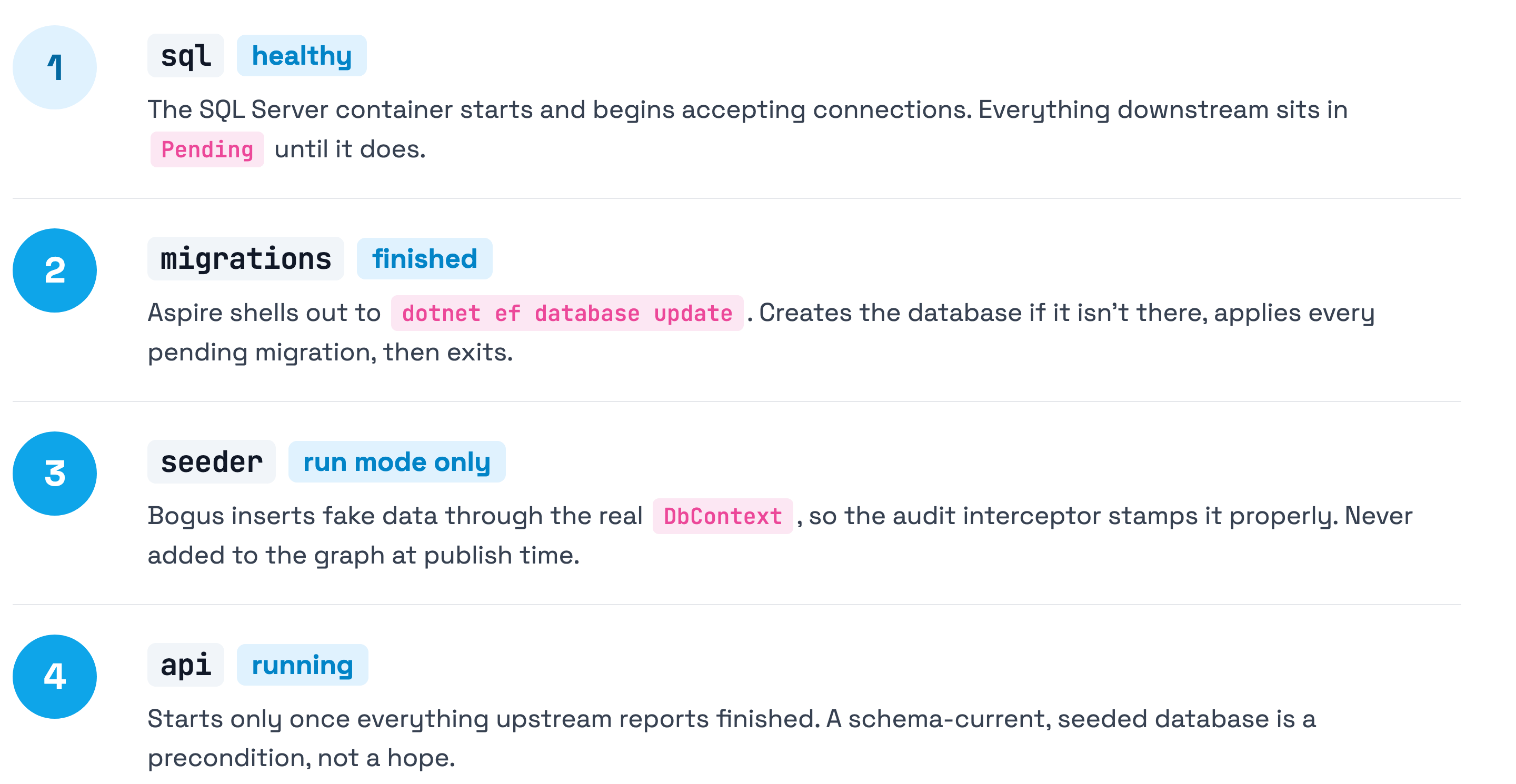
With the guard moved up to the AppHost, the seeder worker gets a lot shorter:
protected override async Task ExecuteAsync(CancellationToken stoppingToken)
{
    using var activity = ActivitySource.StartActivity("Seeding database", ActivityKind.Client);

    var sw = Stopwatch.StartNew();
    using var scope = serviceProvider.CreateScope();

    // No environment check: the AppHost only adds this resource in run mode, so it
    // can never reach a deployed environment. The schema is already in place — the
    // "migrations" resource runs to completion before this project starts.
    var initializer = scope.ServiceProvider.GetRequiredService<ApplicationDbContextInitializer>();
    await initializer.SeedDataAsync(stoppingToken);

    sw.Stop();
    logger.DatabaseSeeded(sw.Elapsed);
}
EnsureDatabaseAsync and CreateSchemaAsync are gone. dotnet ef database update creates the database if it isn't there, so the whole DbContextInitializerBase we'd been carrying around got deleted.
The BuildServiceProvider Trap
While we were in there, we hit a bug worth writing up, because I suspect it's in a lot of Aspire seeders.
The seeder needs an audit interceptor so seeded rows get proper CreatedBy / CreatedAt values. The obvious way to wire that up looks like this:
// Don't do this.
builder.AddSqlServerDbContext<ApplicationDbContext>("AppDb", configureDbContextOptions: options =>
    options.AddInterceptors(builder.Services.BuildServiceProvider()
        .GetRequiredService<EntitySaveChangesInterceptor>()));
Why does anyone write that? Because AddSqlServerDbContext's options callback hands you no service provider, so there's nowhere to resolve the interceptor from. BuildServiceProvider() looks like the escape hatch.
It isn't. It builds a second, detached container. The interceptor you get back belongs to a different object graph than the one your app runs on. Different singletons, different everything. It compiles, it runs, and the behaviour is subtly wrong in a way no green build will ever tell you about.
ConfigureDbContext is the actual answer, because it gives you the real provider:
builder.Services.AddSingleton(TimeProvider.System);

// Singleton, not scoped: AddSqlServerDbContext registers a *pooled* DbContext, so its options
// are built once against the root provider, which cannot resolve scoped services. Both types
// are safe as singletons here — the interceptor holds no per-operation state, and the seeder
// runs as one process under one fixed identity.
builder.Services.AddSingleton<EntitySaveChangesInterceptor>();
builder.Services.AddSingleton<ICurrentUserService, SeederUserService>();

builder.AddSqlServerDbContext<ApplicationDbContext>("AppDb");

builder.Services.ConfigureDbContext<ApplicationDbContext>((serviceProvider, options) =>
    options.AddInterceptors(serviceProvider.GetRequiredService<EntitySaveChangesInterceptor>()));
The singleton registrations are the part that trips people up. AddSqlServerDbContext registers a pooled DbContext, and pooled contexts build their options once against the root provider. The root provider can't resolve scoped services, so an AddScoped<EntitySaveChangesInterceptor>() here throws at startup. Singleton is correct in a seeder (one process, one identity, no per-operation state), but think about it before you copy this into your API.
If you want to verify this yourself, seed a database and check the audit columns. Every row should show your seeder's identity:
SELECT TOP 5 Name, CreatedBy, CreatedAt FROM Heroes;
-- CreatedBy should be 'Seeder', not NULL
That's the assertion I'd write. A build passing tells you nothing here.
Deploying - What Aspire Does and Doesn't Do
Here's the cost, stated plainly: aspire deploy does not apply your migrations.
That's worth sitting with for a second, because aspire deploy is a genuinely capable command and it's where the docs are heading. aspire publish produces artifacts and stops. aspire deploy goes further, resolving parameters and applying changes to your target environment, and Aspire's own App Service deployment guide reaches for it as the way to ship. Reasonable to assume it covers your schema too.
It doesn't, and the division of labour is worth stating explicitly. Aspire's job ends at building the bundle. PublishAsMigrationBundle() compiles your migrations into a self-contained executable and drops it at efmigrations/migrations in the publish output. That's the whole contract. Pointing it at the right database and running it is your job:
aspire publish --output-path ./publish
./publish/efmigrations/migrations --connection "<target-connection-string>"
Note what that connection string implies. Aspire knows which database your app talks to at runtime, but the bundle is a standalone binary with no idea where it's being aimed. Whoever runs it decides which database gets the schema change, and nothing in the pipeline stops them aiming at the wrong one. Put it in your release pipeline behind whatever approval your staging and production environments deserve, and pull the connection string from the same place the app gets it. A hand-run bundle and a copy-pasted connection string is how a dev database migration lands in production.
That's a genuine regression against the old behaviour, where deploying the App Service applied migrations as a side effect of it starting. We accepted it, because that convenience was bought with an always-on web app and an environment variable that also decided whether production got seeded.
The bundle is a self-contained native executable built for the platform that published it. Publish on an Apple Silicon Mac and you get an arm64 Mach-O binary that will not run on your Linux CI agent. Whatever runs
aspire publishhas to match wherever the bundle executes.
Three options, depending on how your team ships schema changes:
| Option | Output | Runs automatically? | Notes |
|---|---|---|---|
PublishAsMigrationBundle() | Native executable | No | Platform-coupled. What the template uses. |
PublishAsMigrationScript() | Idempotent .sql | No | No platform problem, and reviewable before it runs. DBA-gated shops will want this. |
PublishAsAzureContainerAppJob() | Container App Job | Yes | The only option that runs on deploy, but it needs Azure Container Apps. |
The template targets App Service, not Container Apps, so the automatic option was off the table for us. If you are on Container Apps, take it. It's clearly the nicest of the three.
If you're going the bundle route on a GitHub Actions pipeline against Azure SQL, I've already written up the firewall pain that awaits you in Azure SQL Databases - Deploying Updates with EF Core and GitHub. That post predates all of this and every word of it still applies, because it's the same bundle.
Here's what all of this actually looks like on disk. Two things are worth staring at:
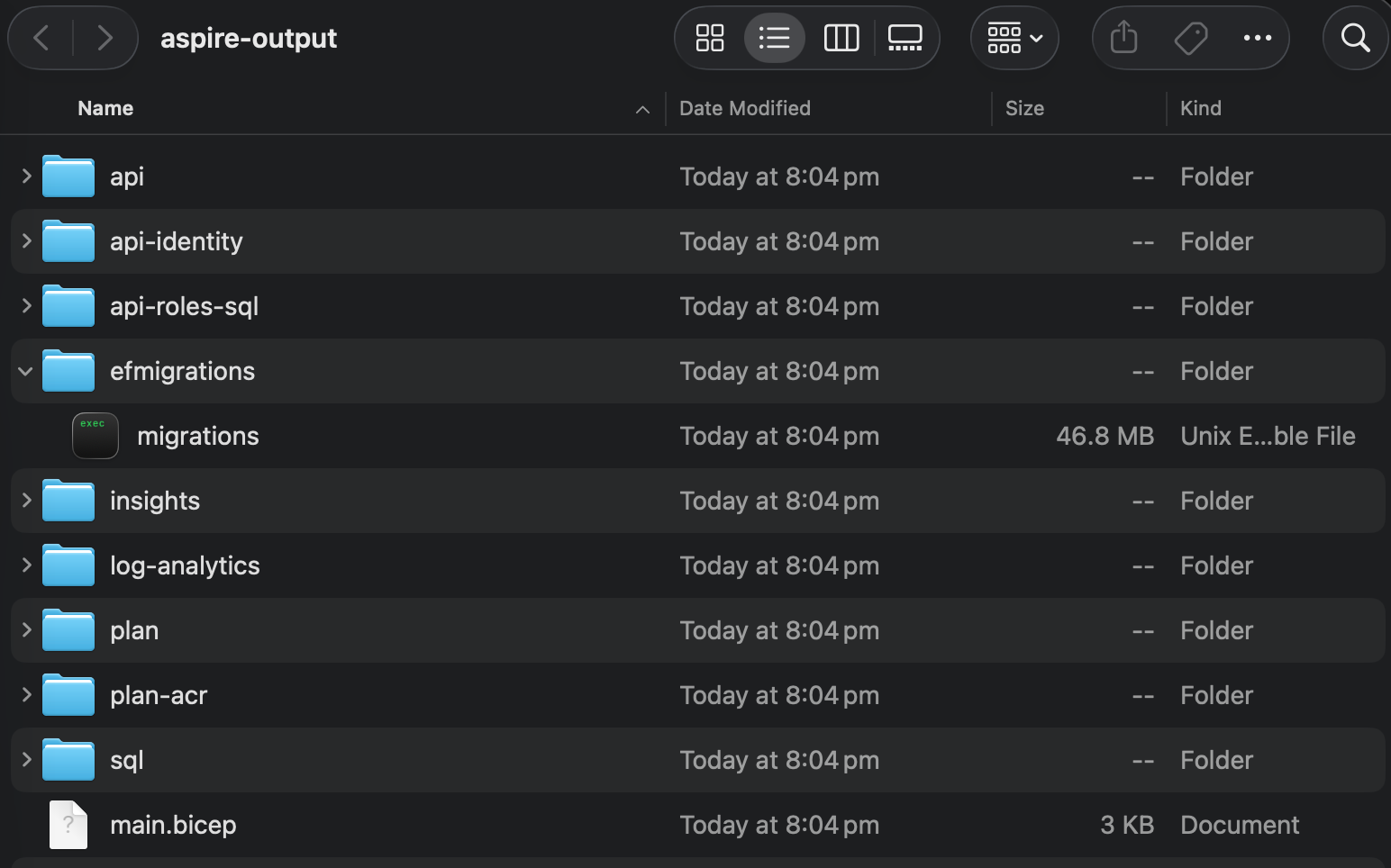
Figure: The publish output. efmigrations/migrations is a 46.8 MB Unix executable, and there is no seeder anywhere to be found.
The first is what's missing. There's an api, a sql, the Bicep and the supporting Azure bits, and no seeder. That's IsRunMode doing its job, visible in a file listing rather than promised in a code comment.
The second is that migrations is 46.8 MB and macOS calls it a Unix Executable File. That's the platform coupling made concrete. It isn't a script or a DLL that any machine with the right runtime can pick up. It's a compiled binary for the machine that produced it, which is exactly why publishing on your Mac and running on a Linux agent doesn't work.
Gotchas
A few things worth knowing before you commit to this.
The package is prerelease. Aspire.Hosting.EntityFrameworkCore has only ever shipped on the prerelease channel. In our case it ships in a public template, so consumers inherit any API churn before GA. It does coexist cleanly with the stable Aspire.Hosting.* 13.4.6 pins. Release builds came back with zero warnings under TreatWarningsAsErrors and no NU1903 from NuGetAudit. But go in with your eyes open.
dotnet-ef is now a boot prerequisite. New contributor clones the repo, runs aspire start, and it fails. Put dotnet tool restore in your README's "first run" steps, not buried in the CI config.
Design-time DbContext construction has to work. dotnet ef database update builds your model without the app's DI container. If you're doing anything clever in ConfigureConventions, that's where you'll find out. Our risk was Vogen strongly typed IDs via RegisterAllInVogenEfCoreConverters(), and they resolved fine with no special handling. It's still the first thing I'd check on your own codebase.
Multiple DbContext types need the type name. One context per assembly and Aspire figures it out. Two and you'll need the fully qualified name argument, or WithMigrationsProject<T>().
Summary
The hand-rolled MigrationService was never a great pattern. It was just the only pattern. AddEFMigrations replaces it with something the platform owns:
- Migrations are a real resource with a lifecycle, dashboard visibility, and their own logs. Not a project that looks like every other project.
RunDatabaseUpdateOnStart()handles local development. Start the app, the database is current.builder.ExecutionContext.IsRunModeis a far stronger seeding guard thanIsDevelopment(), because the resource never enters the published graph at all.- Pin
dotnet-efin.config/dotnet-tools.json. Aspire honours the manifest over a global install. - Watch the deployment step.
aspire deploybuilds the bundle, it doesn't run it. Pick your artifact (bundle, script, or Container App Job) deliberately, and make sure someone owns pointing it at the right database. - Check your seeder's DI. If you see
BuildServiceProvider()in there, it's building a second container and your interceptors aren't the ones you think they are.
We wrote all of this up as an ADR, including the three costs we knowingly accepted. This is exactly the kind of decision that deserves the record. Six months from now, when someone asks why deploying doesn't migrate the database, the answer is written down.
Give it a try on your own Aspire solution and let me know how you go. And if you've still got a MigrationService project sitting in your tools folder, go and check what else it's doing while it's in there. 😉
Resources
- Apply EF Core migrations in Aspire (the official docs for
AddEFMigrations) - EF Core migration bundles
- Deploy Aspire AppHost projects to Azure App Service
- SSW.VerticalSliceArchitecture (the template this post is based on)
- ADR - Use Aspire's AddEFMigrations for Database Migrations
- Aspire - Where should the configuration live?