- Published on
Matt Pocock's Skills: Choosing The Right Workflow
15 min read- Authors

- Name
- Daniel Mackay
- @daniel_mackay
- Introduction
- Prerequisites
- The main flow in 60 seconds
- Session count, not project size
- Find your workflow
- The five workflows
- Close the loop with /retro
- Between phases: continue, clear, hand off, delegate or compact?
- Gotchas worth knowing
- Summary
- Resources
Introduction
I recently finished Matt Pocock's AI Coding Crash Course. It covers the basics of agentic engineering: how context windows work, why agents fall apart on big or long-running work, and how to plan, delegate and review instead of prompting and hoping. Most of it is taught through his skills plugin, a set of slash commands that each own one part of the job.
The course presents a main workflow. Grill the idea, write a spec, slice it into tickets, implement each ticket, review, then retro. It's a great flow. But it isn't one size fits all.
Some days I'm fixing a single validation rule. Some days I'm building a small feature I can finish in one sitting. And every now and then I'm staring at a huge feature with no idea where to start. Running the full spec-and-tickets ceremony on a one-line fix is overkill. Going straight to /implement on a feature that won't fit in one context window ends in tears. 🤷
So how do you adjust the workflow based on the task at hand? That's what this post is about. I turned my notes from the course into an interactive wizard. Answer up to four questions and it tells you which workflow fits the job, which skills to run, and where to clear your context. After that, we'll walk through each of the five workflows and the traps to watch for.
NOTE: This post is based on skills v1.3.1. The skills change often, so check the latest versions.
Prerequisites
- An agent harness that supports skills. I use Claude Code.
- Matt's skills plugin installed.
/setup-matt-pocock-skillsrun once per repo. It records where your issues live (GitHub, GitLab, local.scratch/markdown or something custom), your triage labels, and whereGLOSSARY.mdand ADRs (Architecture Decision Records) go./to-spec,/to-tickets,/implement-spec,/code-reviewand/wayfinderall read that config.
The main flow in 60 seconds
Before we start bending the main flow, here's what's in it. These are the skills the five workflows are built from:
| Skill | What it does | Who runs it |
|---|---|---|
/wayfinder | Multi-session planning for work too foggy to grill in one go | You |
/grill-with-docs | Interviews you about every open decision, each with a recommended answer. Records terms in GLOSSARY.md and decisions in ADRs | You |
/prototype | Throwaway code that answers one design question you can't settle by talking | You or the agent |
/to-spec | Turns the grilled conversation into a spec issue. No interview, just synthesis | You |
/to-tickets | Splits the spec into tracer-bullet vertical slices with blocking edges, each sized for one fresh context window | You |
/implement | Builds one ticket (or the plan in the current thread), driving /tdd and /code-review, then commits | You |
/implement-spec | Builds a whole spec as a task graph, with subagents in their own worktrees | You |
/tdd | Red → green, one vertical slice at a time, at the test seams you agreed | You or the agent |
/code-review | Two parallel subagents. One checks your documented coding standards, the other checks the code against the spec | You or the agent |
/pr | Shapes the PR body: a summary visual, before/after evidence and the merge danger | The agent |
/retro | Reads the session and proposes fixes to the agent's environment (lint rules, coding standards, steering files) | You |
The "who runs it" column matters more than it looks. User-invoked skills (the ones you type) orchestrate. Model-invoked skills like /tdd, /code-review and /pr hold the discipline, and the agent can reach for them on its own. A user-invoked skill can call model-invoked ones, but never another user-invoked one.
Lost? Type /ask-matt. It's a router over the skills: describe your situation and it names the next command, where to clear or compact, and where you'll review. It works from one-line summaries though, so before you act on a claim it makes, have it open the skill's SKILL.md.
Session count, not project size
When I'm deciding how much process a piece of work needs, my instinct is to ask "how big is this?". The course convinced me that's the wrong question.
Two ideas from the course explain why:
- Stay in the smart zone. Up to about 150k tokens, the model still reasons sharply. Past that, quality drops. So the grilling, spec and tickets should happen in one unbroken window, and you only change context at the boundary between phases.
- Facts are the agent's job, decisions are yours. Grilling asks you every open decision, each with a recommended answer. Anything it can look up in the repo or with its tools, it looks up itself. If you've read my post on clarifying questions, this is that idea turned into a skill.
The spec exists because context windows end. The tickets exist so each piece of the build fits in a fresh window. So the questions that pick your workflow are: will this work fit in one context window, and can I see the way to the end yet?
A massive codebase with a small, well-understood change is still tiny work. A small codebase with a fuzzy greenfield feature might need /wayfinder. Project size doesn't come into it.
Find your workflow
Answer the questions below and the wizard will land you on one of five workflows. It shows the skills in order, the context move between each one (continue, /clear or a new session), and the trap people most often fall into on that path. If you already know the shape of your work, jump straight to a workflow with the buttons at the bottom.
Is this one concrete behaviour that's already decided?
A validation rule, a transformation, a contract tweak. Defined inputs, an observable output, and nothing left to design.
Already know the shape of the work? Jump straight to a workflow:
The five workflows
The wizard gives you the short version. Here's the longer one, with the reasoning behind each workflow.
Tiny: one behaviour, test-first
Use it when you have a single behaviour with defined inputs and an observable output. A validation rule, a transformation, a contract tweak. Nothing needs designing.
/grill-with-docs     (optional, only if something is still undecided)
  ↓ continue
/tdd                 confirms the seams with you, then red → green one slice at a time
  ↓ continue
/code-review main    Standards + Spec in parallel
  ↓ continue
open a PR            the agent writes the body in /pr shape
/tdd starts by naming the public seams it plans to test at, with a note on what each one catches and misses. Once you confirm, it runs vertical slices: one failing test, then just enough code to pass. Refactoring isn't part of the loop. That happens when /code-review flags smells and you decide which to fix.
With no spec, the Spec axis of /code-review just reports "no spec available". That's fine.
Watch out: not everything is worth the loop. For config, wiring, glue code or straight CRUD there's no independent source of truth to assert against, so /tdd tends to produce tautological tests. Nothing in the skill decides whether a change deserves TDD. That call is yours.
Fits one session: grill, then build
Use it when some decisions are still open, but planning and building together will fit in one context window.
/grill-with-docs     rounds of numbered questions until the design tree is empty
  ↓ continue         (the build wants the reasoning verbatim)
/implement           "the plan is in this conversation"
  ↓ continue
open a PR            body in /pr shape
/grill-with-docs runs /grilling and /domain-modeling together. Each round asks every decision whose prerequisites are settled, and "yes" accepts its recommended answer. It writes GLOSSARY.md and ADRs as terms settle, so the next session (and the next developer) speaks the same language.
Then /implement builds what was decided and never reopens the plan. It drives /tdd at the agreed seams, typechecks as it goes, runs the full suite once at the end, runs /code-review and commits.
If a question can only be answered by running something (a state model, or a UI you need to see), take the prototype detour. /handoff out, run /prototype in a fresh session, then /handoff the verdict back into this thread.
Watch out: don't add /to-spec "for safety". On single-session work it's an extra synthesis step where the model can drift, and it buys you nothing. The spec exists because context windows end, and this one doesn't.
Multi-session: the main flow
Use it when the decisions can be made in one sitting, but the build won't fit in one context window. This is the flow the course teaches.
/grill-with-docs     shared understanding + vocabulary
  ↓ continue         (one unbroken window)
/to-spec             agrees test seams with you, publishes the spec
  ↓ continue         (don't clear or compact here)
/to-tickets          vertical slices with blocking edges; you approve the breakdown
  ↓ /clear
/implement #N        one frontier ticket; drives /tdd + /code-review, commits
  ↓ /clear, then the next frontier ticket ↺
open the PR          body in /pr shape
The spec keeps the reasoning alive after the grilling session is cleared. It has the problem, the solution, a long list of user stories, implementation and testing decisions, and what's out of scope. When you review it, read the test seams and the Out of Scope section first. Mistakes are cheapest to catch there.
The tickets are disposable. Each one is a tracer-bullet slice through every layer, demoable on its own, and sized for one fresh window. That's why you can /clear between them: each ticket stands alone, so the previous ticket's context can go.
Watch out: the spec issue gets the ready-for-agent label, which means "complete enough to work from", not "build this". AFK (away from keyboard) agents polling that label will try to build the whole spec at once. Exclude the parent spec in their prompt, or remove the label after /to-tickets.
Multi-session, parallel: build a task graph
Use it when you've done the same planning as the main flow, the tickets form a real graph, and you'd rather orchestrate a fleet than start each session by hand. People tend to cite five or more tickets as the point where this pays off.
This one's my favourite. 👑
If you've ever run the multi-session workflow and found yourself babysitting the agent, sitting there waiting to type /implement on the next ticket, you'll know it gets real old real quick. /implement-spec takes most of that away. You hit the button, walk away and get on with other work. And if you put in a quality grilling session up front, you're all but guaranteed a quality result at the end.
/grill-with-docs → /to-spec → /to-tickets    (all in one window, as above)
  ↓ /clear
/implement-spec      integration branch, one worktree per ready ticket, a merger subagent
/implement-spec reads the tickets as a task graph and creates an integration branch. Implementer subagents run in the background, one per frontier ticket, each in its own worktree and each driving /tdd. A merger subagent lands each result, and when the frontier changes, more implementers start. At the end, one /code-review runs over the whole integration branch, the fixes go in, and the draft PR is marked ready.
If you've read my post on parallel vibe coding with git worktrees, this is that idea with an orchestrator doing the juggling for you. Neat!
Watch out: this isn't for small work. With no real graph, plain /implement is simpler. And don't fake parallelism by running several /implement sessions in the same checkout. That's exactly what /implement-spec's per-ticket worktrees are for.
Huge and foggy: wayfinder first
Use it when the way to the destination isn't visible yet, and even the planning won't fit in one session. Think greenfield products, or a huge feature where you don't know what you don't know.
/wayfinder <loose idea>    name the destination, grill breadth-first, create the map + tickets
  ↓ /clear                 (charting resolves nothing else)
/wayfinder <map>           claim one frontier ticket, resolve it, record it, add new tickets
  ↓ /clear, then the next ticket ↺ (one per session)
/to-spec #<map>            collapse the linked decisions into one buildable spec
  ↓ continue
/to-tickets                implementation slices
  ↓ /clear
/implement #N  or  /implement-spec
/wayfinder charts a wayfinder:map issue on your tracker, with child decision tickets wired up with blocking links. Each ticket is resolved by its type: grilling (you're in the loop, and it's the default), prototype (also you), research (runs AFK in a background subagent) or task (does work that unblocks a decision). Wayfinder's output is a set of decisions. When the map clears, it hands off and doesn't build anything.
When you get to /to-spec, point it at the map issue, not at individual tickets. Going straight from the map to /implement throws away all that linked detail.
Watch out: the common mistake is using wayfinder on a well-scoped feature. It's slower and denser than grilling. If the opening grill finds no fog, it stops and tells you a map isn't needed. Also scope each map to one bounded destination (think one epic), not the whole product. Otherwise later tickets rest on assumptions that earlier ones overturn, and you've reinvented waterfall. 😉
Close the loop with /retro
None of the workflows above end with /retro, but you can run it at the end of any of them. Run it before you clear, or point it at the session log afterwards.
It reads the session and proposes fixes to the agent's environment, most severe first: lint rules, coding standards, steering files. Mechanical mistakes become deterministic checks (a lint rule, a pre-commit hook or a CI job). Judgement calls go into CODING_STANDARDS.md, which /code-review reads next time.
It only proposes and never applies, so you choose what to adopt. It can also invent generic advice to fill its categories, so drop any candidate you can't trace back to a specific moment in the session.
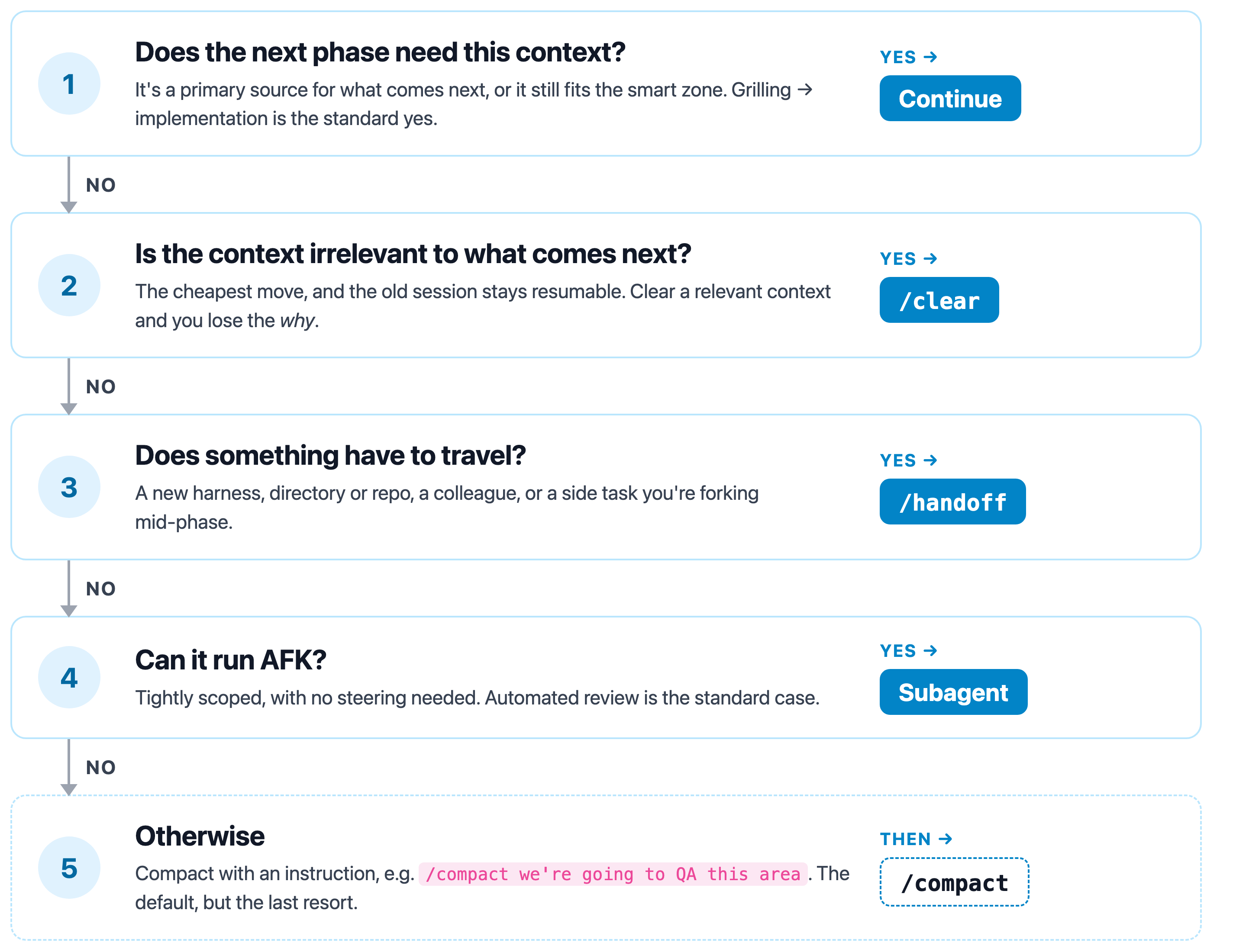
Between phases: continue, clear, hand off, delegate or compact?
Every workflow above has arrows between the steps, and each arrow is a decision about your context. A phase is one chunk of a session: the grilling, the implementation, the QA. Matt's advice is to only make this call at the boundary between two phases. Mid-phase, you either continue or send the rest of the work to subagents.
Go through these top to bottom. The first yes wins.
Gotchas worth knowing
A few things that aren't obvious from the skill names:
/implementcommits to whatever branch you're on. It never creates one, so branch first.- Tell
/implementwhere the plan is. ItsSKILL.mdtalks about a spec or tickets. When the plan only lives in the conversation, say so. - Some skills are hidden from the agent. 16 of the 27 skills are user-invoked only, so they don't appear in the agent's skill list and it may tell you they aren't installed. Type them anyway.
- Don't
/triagethe tickets from/to-tickets. Triage is for raw issues you didn't create. Tickets from/to-ticketsare already agent-ready.
Summary
Matt's main flow is a great default, but the right amount of process depends on the job in front of you.
- Pick the workflow by session count, not project size. Ask whether the work fits in one context window, and whether you can see the way to the end yet.
- Tiny work goes straight to
/tddand/code-review. - One-session work grills and builds in the same window. Skip the spec.
- Multi-session work uses the main flow: grill, spec, tickets, then one ticket per fresh session. Reach for
/implement-specwhen the tickets form a real graph. - Huge, foggy work starts with
/wayfinderand joins the main flow at/to-spec. - Decide what to do with your context only at phase boundaries, and rule out simply continuing before anything else.
The habit I'm trying to build now is asking "how many windows?" before I reach for a skill. Give the wizard a try on whatever you're working on next and let me know where it lands you. 😀
Resources
- AI Coding Crash Course (Matt Pocock, AI Hero)
- mattpocock/skills (the skills plugin, including each skill's
SKILL.md) - Efficient Vibe Coding: How Clarifying Questions Make AI Actually Useful
- Parallel Vibe Coding: Using Git Worktrees with Claude Code